Day 1: JSON & BSON
1. JSON (Javascript Object Notation)
Json được xây dựng dựa trên 2 cấu trúc:
- Một bộ sưu tập của các cặp
key: value - Một danh sách giá trị theo thứ tự (như
array)
Json support các kiểu dữ liệu:
- String
- Number
- Boolean
- Object
- Array
- Null
2. BSON (Binary JSON)
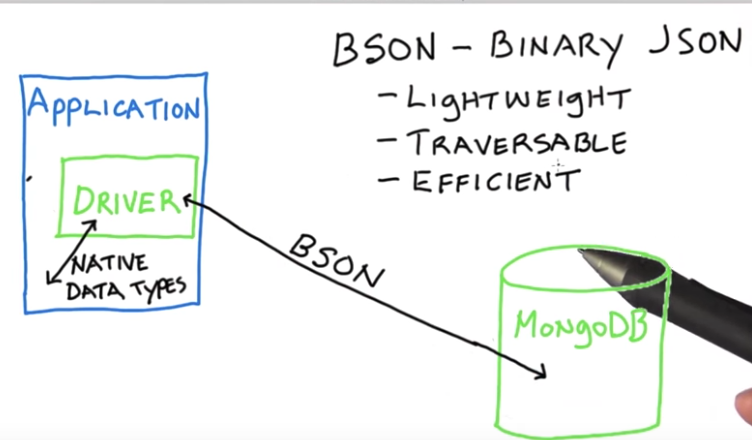
BSON là một định dạng kiểu dữ liệu, nơi mà lưu trữ các cặp key/value theo thứ tự được biểu diễn như một thực thể (thực thể ở đây đang nói tới chính là document)
Advantages BSON
Lightweight (Nhẹ) & Traversable (khả năng di chuyển): Khả năng lưu trữ một lượng dữ liệu lớn trong BSON file (Lightweight), giúp dễ dàng cho việc lưu trữ hoặc truyền BSON file trong network (Traversable).
Efficent (có hiệu quả): BSON sử dụng không gian nhiều hơn JSON vì nó định nghĩa những tiền tố độ dài (length prefixes) và chỉ số mảng (array indices) rõ ràng. Chính điều này mang lại sự hiệu quả cho việc truy vấn (query) và quét (scan) nhanh hơn.
BSON types
ObjectId
String
- Boolean
- Object
- Array
- Null
Date
Int32
- Int64
- Double
Decimal128 (New in version 3.4.)
min
max
Binary
- Undefined (Deprecated)
- Timestamp
Code
BSONRegex
- BSONSymbol (Deprecated)
- BSONMap
Convert BSON to JSON via MongoDB tools
Sử dụng bsondump để convert BSON file to JSON file
bsondump --outFile=collection.json collection.bson
Import & Export BSON file
Export a collection
mongodump --db=test --collection=records
Import a collection
mongorestore --db=test --collection=records dump/test/records.bson
Export a database
mongodump --db=test
Import a database
mongorestore --nsInclude='test.*' /dump
** Lưu ý: Export file data sẽ được save mặc định vào dump folder, nếu muốn thay đổi nơi export file thì sử dụng thuộc tính --out
Import & Export JSON/CSV/ file
Export a collection (must specify collection to export)
mặc định mongoexport sẽ xuất file dưới định dạng .json
mongoexport --db=test --collection=records --out=records.json
Để xuất file dưới định dạng .csv ta sẽ cần cung cấp thêm các thuộc tính
--type=csvfields=fieldName1,fieldName2,...hoặc--fieldFile=fieldName.txtcho câu lệnh.
mongoexport --db=test --collection=records --type=csv --fields=_id,name --out=records.json
Có thể export data theo điều kiện
mongoexport --db=sales --collection=contacts --query='{"dept": "ABC", date: { $gte: { "$date": "2018-01-01T00:00:00.000Z" } }}'
Import a collection
mongoimport --db=test --collection=records --file=records.json
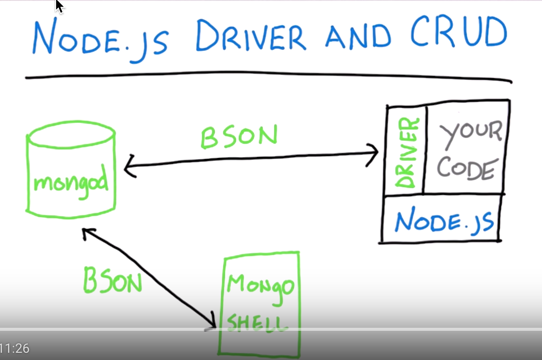
Application giao tiếp với MongoDB thông qua driver (tùy ngôn ngữ sẽ có các driver riêng).